Getting started
Getting started with Apilingual
Choose a language, open your first guided story, and learn the read → look up → practice loop that makes Apilingual work — in about twenty minutes.
If you’ve landed here, you’ve probably already done a beginner app or two. You know some words, you can half-follow a simple sentence, and then you open a real book or podcast and the floor drops out. That gap is exactly what Apilingual is built to cross. This guide walks you through your first session so the app makes sense from the inside — not what it promises, but what you actually do with it.
What Apilingual assumes about you
The short version: we assume you’re past absolute-beginner. You don’t need to be fluent, or even comfortable — “I finished a tree and can sort of read” is the sweet spot. Apilingual works by putting real language in front of you and making every unknown word one tap from understood, which is easier to lean into when you already recognise the shape of a sentence.
That said, if you’re genuinely starting from zero, you’re still welcome here. Every language we support — German, Spanish, Danish, French, Italian, and Turkish — ships with guided stories that begin at the very start and carry you through whole levels a chapter at a time. Each chapter is written to introduce the right handful of new words and wrap them in something odd or funny enough to stick. You don’t have to import anything or know where to begin; you just open the first story and read. So wherever you’re starting, the first move is the same: read something, at your level, with a safety net under every word.
Create your account and choose a language
Sign up with an email address or your Google account — that’s the whole setup. There’s no placement quiz to sweat over and nothing to configure before you can start.
Once you’re in, pick the language you’re learning. This is the one choice that shapes everything that follows: your library, your word counts, your reviews, and your progress are all tracked per language, so switching later never mixes your German up with your Spanish. If you’re studying more than one, that’s fine — each lives in its own separate world, and you flip between them whenever you like. Choose the one you want to work on today and keep moving.
Your first lesson
You don’t need to import anything to start. Open a guided story at your level and you’ll land on the dashboard, which is really just a way back to whatever you were last reading.
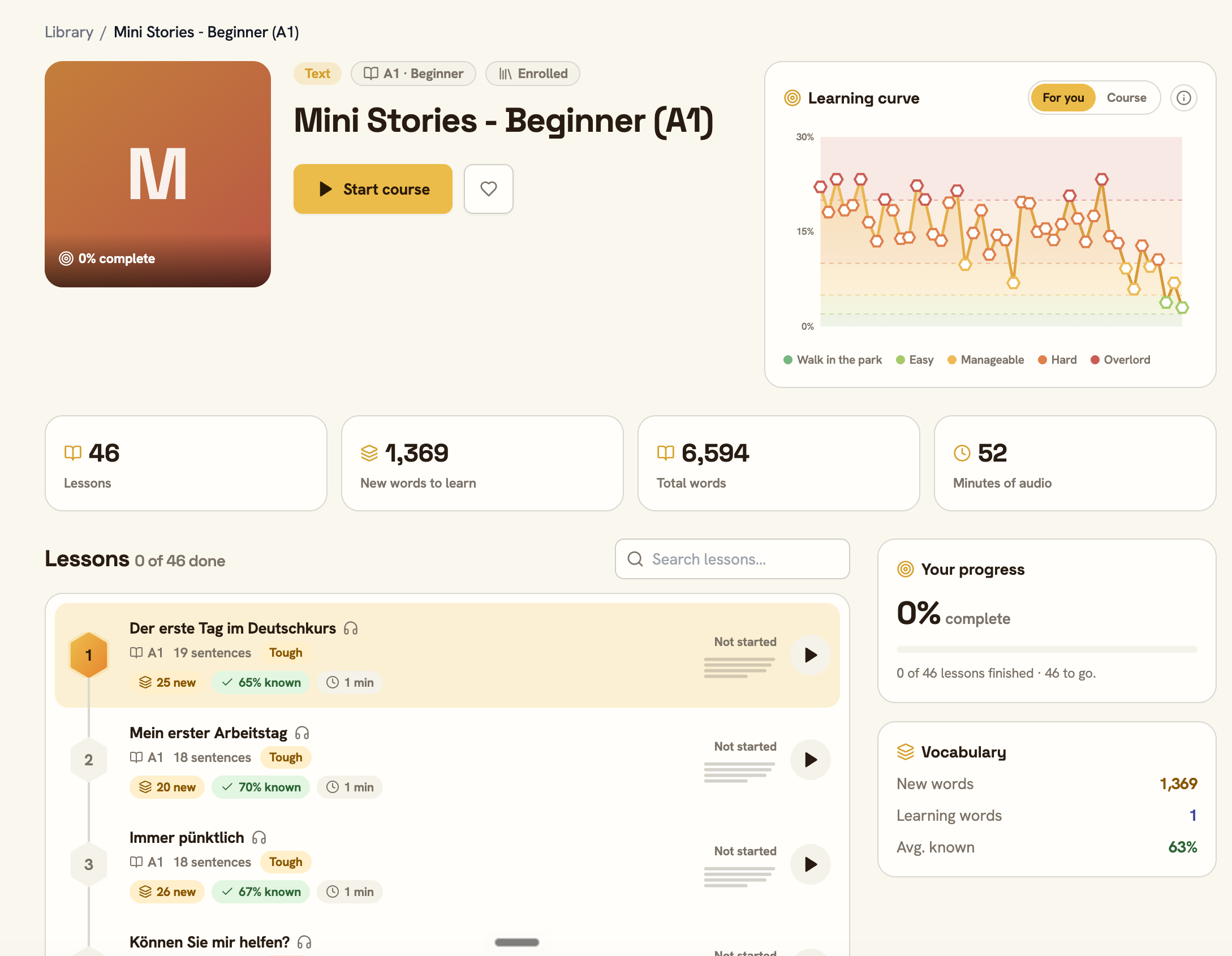
Open the story and you’re in the reader, which is where you’ll spend most of your time. It looks like an ordinary page of text, with two differences that matter.
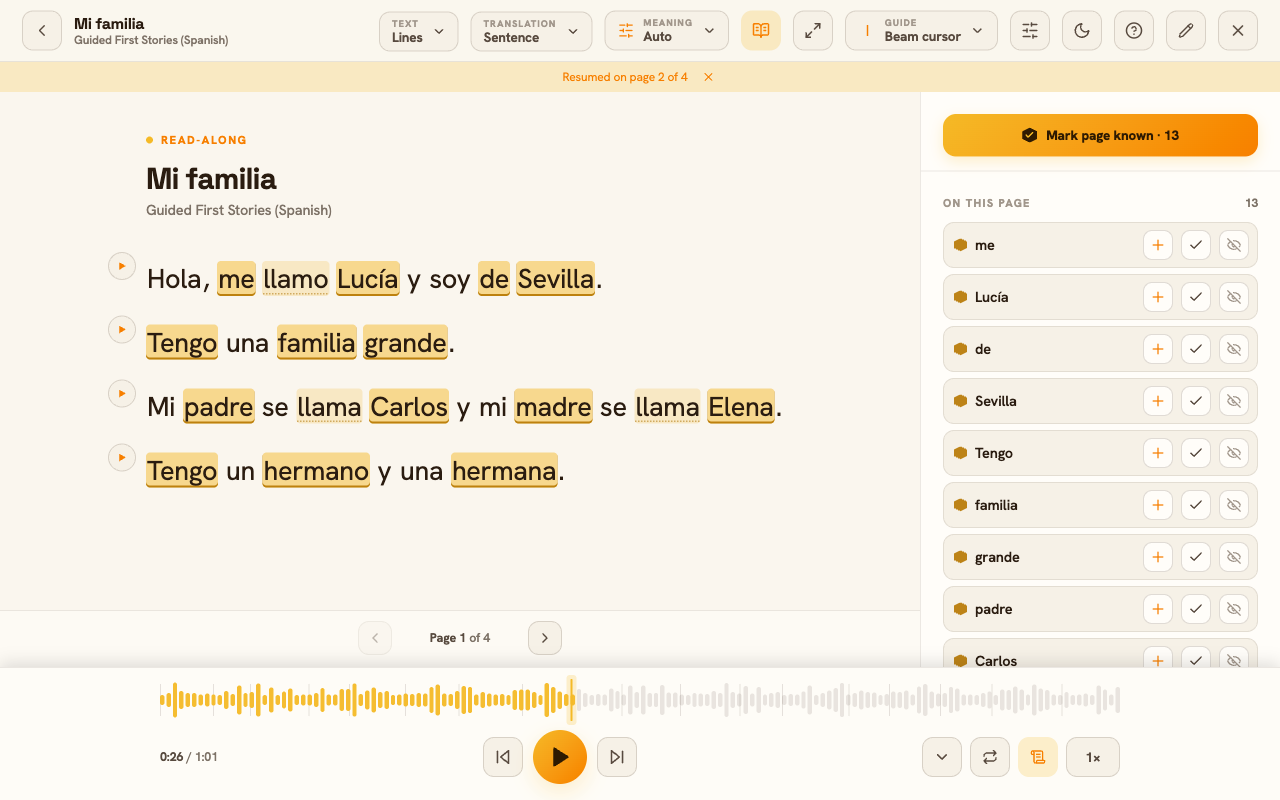
The first difference: tap any word and its meaning appears, right there, without leaving the page. No dictionary tab, no losing your place. Tap, read the gloss, keep going. The whole point is that you never get stranded on a word you don’t know, which is what makes reading slightly-too-hard material bearable instead of exhausting.
The second difference: every word carries a status, and the app shades the page to show it. That shading is quietly doing the most important job in the product — it’s how Apilingual keeps a running map of what you know. The best first session is simply to read a chapter through, tapping whatever you don’t recognise, and letting that map fill in. Don’t try to memorise anything yet. Just read.
What the three statuses mean
Every word you meet sits in one of three states, and they’re worth understanding because you’ll be nudging words between them constantly.
- New — a word you haven’t met yet. When you open your first story, almost everything is new, and that’s normal. New words are the ones the reader highlights most, because they’re where your attention should go.
- Learning — a word you’ve started to work on but don’t own yet. Tapping a new word to look it up, and meeting it again across your reading, moves it here. Learning words are the productive middle: familiar enough to half-recognise, not yet automatic.
- Known — a word you can read without a second thought. You mark a word known when you genuinely don’t need the help any more, and after that the reader stops highlighting it.
That last one is worth saying plainly: known is a promise you make to yourself. The app doesn’t decide it for you — you do, when you tap a word up to known. Be a little honest and a little strict about it. Your word counts, the difficulty match on new content, and your reviews all trust that signal. If you mark words known that you can’t actually read yet, the only person you mislead is future-you. Marked truthfully, that growing pile of known words becomes the most reliable measure you have of where you actually are.
Your first practice session
Reading builds understanding; practice makes it stick. Once you’ve got a few learning words under your belt, Apilingual will start offering short practice sessions built from your own vocabulary — the words you met, not a generic frequency list.
The drills come in a few shapes, and they’re not busywork. They ask you to recognise a word when you see it, recall it when you need it, and eventually produce it yourself — three genuinely different skills, each earned a different way. A word you can pick out of a list isn’t the same as a word you can summon in a sentence, and the practice moves each word forward accordingly.
The scheduling is the part worth trusting. Reviews don’t arrive on a fixed daily calendar; they arrive right when you’re about to forget a word. Get one easily and it won’t come back for a while. Fumble one and it returns sooner. So if a word you thought you knew reappears the next day, that’s the system working, not nagging. You don’t manage any of this — you just show up for the session that’s waiting and answer honestly. (For a fuller look at how mastery is scored, see How vocabulary mastery works.)
What to do next
A modest, honest routine beats a heroic one you’ll abandon in a week. Here’s the whole thing:
- Daily: read for about twenty minutes, and clear the practice session waiting for you. That’s it. The reading grows your vocabulary; the practice locks it in. Twenty minutes of real reading a day compounds faster than you’d expect.
- Weekly: glance at your progress to see your known-word count climbing, and — when the guided stories start feeling easy — bring in something you actually want to read.
That last step is where Apilingual really opens up. Once you’ve got momentum, you’re not limited to the built-in stories: you can import your own ebooks, paste in an article, or turn a podcast or audiobook into a read-along lesson. That’s a guide of its own — Importing your first ebook or audio — for when you’re ready.
For now, keep it simple. Open a story, read a chapter, tap what you don’t know. The rest of the app is built around that one loop, and it starts working the moment you do.